Email marketing with bring-your-own-domain (BYOD) and Amazon SES
How each Markmedi clinic sends campaigns from its own domain, with aligned DKIM, continuous DNS verification, an isolated queue and bounce handling via SNS.
 Rafael Faria Ferreira
When I started Markmedi's email marketing module, the first temptation was the simplest one: send everything from a platform address, something like campanhas@ on our domain, and change only the display name. It works on day one. By month three, a single clinic that buys a list or writes a bad subject line drags down the reputation of the whole domain, and every other clinic's campaigns start landing in spam. On top of that, the patient gets an email from her clinic coming from a domain she has never seen, which is already halfway to the "report spam" button.
The decision was to go with BYOD (bring your own domain): each clinic sends from its own domain, with its own DKIM signature, and one clinic's reputation does not contaminate another's. The price is operational complexity, because I now depend on DNS records that the clinic (or the nephew who runs its website) has to set up and maintain. This article is about how I dealt with that.
One SES identity per clinic
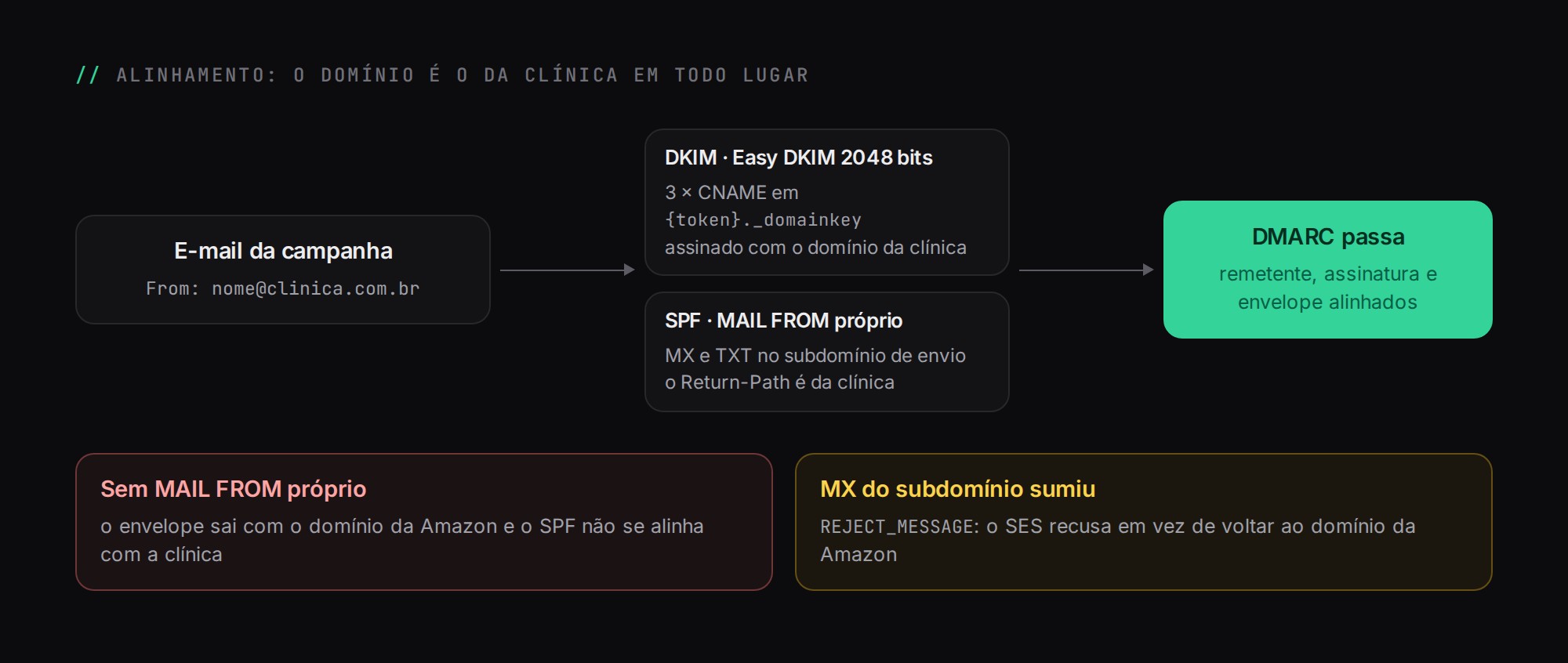
Each clinic has at most one sending identity. When the administrator enters the domain, I normalize the input (strip the scheme, path, port and www.) and call the SES v2 API to create an email identity with 2048-bit Easy DKIM. The AWS calls happen outside the database transaction: I do not want to hold a lock while waiting on the network.
Along with the identity, I configure a custom MAIL FROM on a sending subdomain. Without it, the envelope (the Return-Path) would go out with Amazon's domain, SPF would align with Amazon rather than the clinic, and DMARC would not pass via SPF. The detail that matters most here is the behavior on MX failure: I set it to REJECT_MESSAGE. If the subdomain's MX record disappears, I would rather have SES refuse to send than silently fall back to Amazon's domain and start producing misaligned emails.
The domain is unique across the entire table. A clinic cannot register another clinic's domain, and that also holds for the race where two clinics register the same domain in the same second: the check in code catches the common case, and the unique index violation catches the rare one, which I translate into the same error message.
The records the clinic has to create
The domain screen shows exactly what needs to go into DNS, with a "copy all" button in a format that can be pasted straight into a WhatsApp message to whoever manages the domain. In practice, this is the set:
Record | Where | What for |
|---|---|---|
3 × CNAME |
| Easy DKIM public keys, which AWS rotates on its own |
MX | sending subdomain | Receives bounces for the MAIL FROM |
TXT (SPF) | sending subdomain | Authorizes SES to send using the clinic's envelope |
TXT (DMARC) |
| Recommended, not required to enable sending |
I put SPF on the sending subdomain on purpose. That way I do not have to touch the SPF of the clinic's root domain, which often already includes Google Workspace or another provider and is close to the DNS lookup limit.
Verification as a state machine
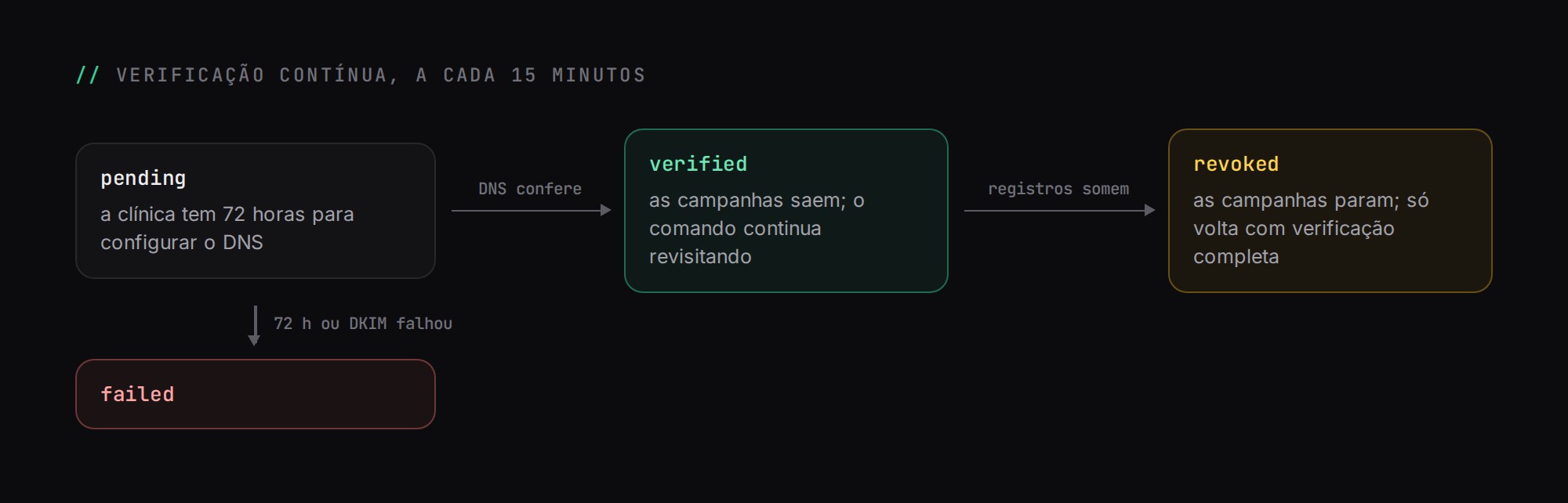
An identity goes through four states: pending, verified, failed and revoked. A command scheduled every 15 minutes queries SES and advances the state. The clinic has a 72-hour window to configure DNS; after that, or if DKIM fails, the identity moves to failed.
What caused me the most trouble early on was assuming verified was a final state. A verified domain does not stay verified forever: someone switches DNS providers, migrates the website, deletes "those weird records" and sending starts to fail. That is why the command also revisits identities that are already verified. If the records disappear, the identity moves to revoked, that clinic's campaigns stop going out, and it can only send again after a full re-verification. Every relevant transition notifies the clinic's administrators, with the reason.
The sending pipeline
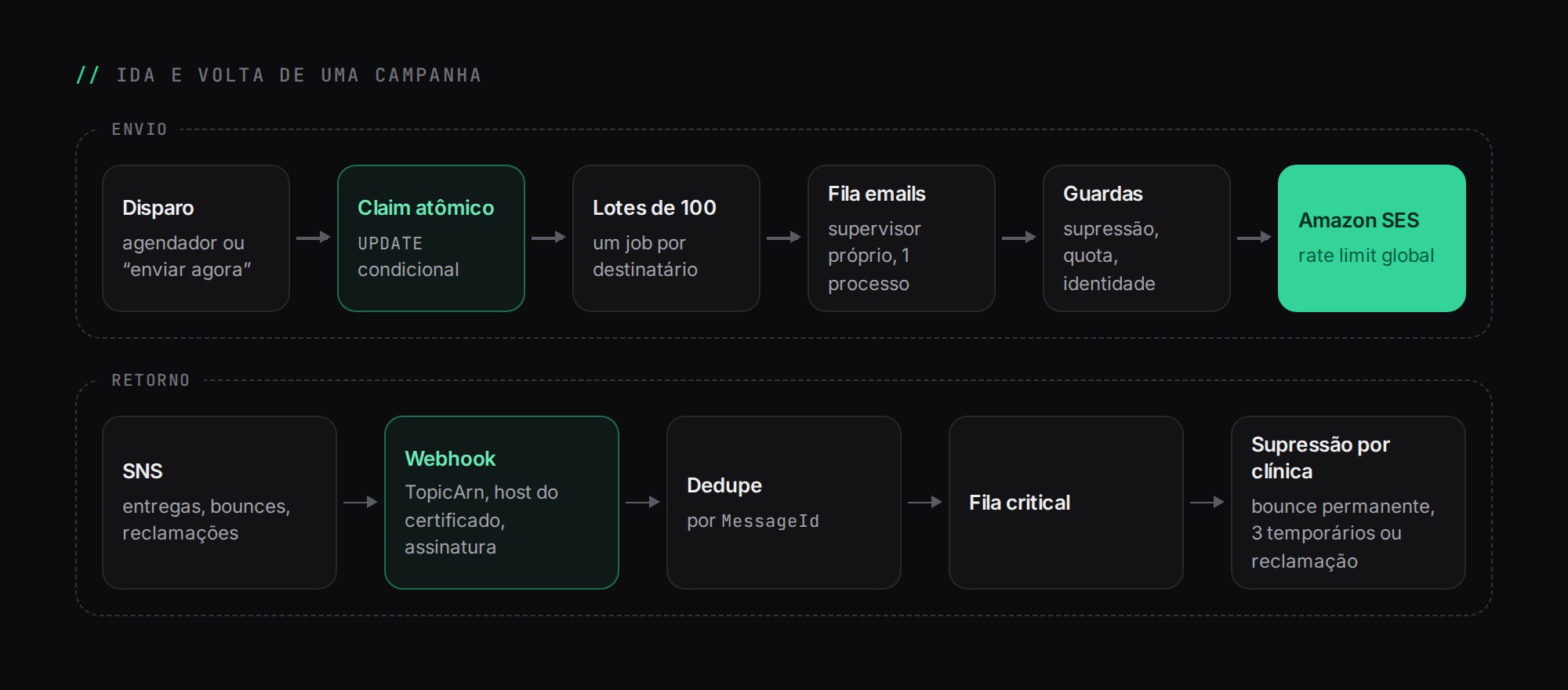
A campaign can be triggered from two places: the scheduler (scheduled campaigns) and the "send now" button. So that the two entry points never fire the same campaign twice, the first step is an atomic claim: a conditional UPDATE that only changes the status if it is still in the expected state. Whoever fails to make the claim gives up.
After that, I do not load the entire audience into memory. The dispatcher walks through recipients in batches of 100 and, for each one, pushes a job onto the emails queue. The batch size also determines how quickly a cancellation takes effect: if the clinic cancels midway, at most one batch is already on its way. The emails queue has its own Horizon supervisor, with a single process, so that a large campaign never competes for workers with appointment reminders. I wrote more about that separation in queues with Laravel Horizon.
Each recipient job goes through a sequence of guards before sending: recipient without an email, cancelled campaign, missing or unverified identity, suppressed address (unsubscribe or bounce) and exhausted quota. Each early exit writes a row to the message log with the reason, and that log has a unique idempotency key. If the job runs twice, the second run finds the row and does not send again.
Global rate limit, per-clinic quota
The SES sending limit is per AWS account, not per clinic. That is why the ses-send rate limiter is global, applied as job middleware. If I had a per-clinic limiter, ten clinics sending at the same time would blow through the account limit and SES would start rejecting.
Each clinic's monthly quota (which depends on its plan) is controlled by a counter in a single row, incremented with compare-and-set:
UPDATE email_quota_counters
   SET used = used + 1
 WHERE clinic_id = ? AND period = ? AND used < quota_limit;
-- 1 row affected: OK to send. 0 rows: quota exhausted.
No explicit lock is needed: the UPDATE itself is atomic. The counter is just a fast shortcut; the source of truth is the log of sent messages, and there is a reconciliation step that recalculates the counter from it if the two diverge.
Pausing
A paused campaign cannot simply make its jobs fail. The job checks for the pause, puts itself back on the queue with a delay of a few minutes and extends its own expiration deadline, so that a long pause does not turn every pending send into a failure. Jobs from a paused campaign also skip the rate limiter, so they do not eat into the capacity of whoever is actually sending.
Headers that matter
The From always uses the clinic's verified domain. A campaign can change the display name and the Reply-To, but not the sender's domain, because that is what has to align with DKIM for DMARC to pass.
Every email goes out with List-Unsubscribe and List-Unsubscribe-Post: List-Unsubscribe=One-Click, the RFC 8058 one-click unsubscribe that Gmail and Yahoo now require from bulk senders. The SES configuration set is chosen based on the clinic's preference: with open and click tracking, or without. Test emails always use the set without tracking. Message tags carry only identifiers (clinic and send), which is what I need to match events back up.
Bounces and complaints via SNS
SES publishes deliveries, bounces, complaints, opens and clicks to an SNS topic, which calls a Markmedi webhook. A public endpoint that modifies suppression lists is an obvious target, so it has three fences before it accepts anything:
- The
TopicArnmust be on a configured allowlist. An empty list rejects everything. - The signing certificate URL must point to an AWS SNS host, validated with a regular expression, before I download anything.
- The signature is verified with
openssl_verify, for SNS signature versions 1 and 2. An unknown version is rejected.
The SNS subscription confirmation is only followed if the URL belongs to AWS itself, which prevents the webhook from being used to make the server fetch arbitrary URLs. Each event is deduplicated by MessageId before going onto the critical queue, because SNS delivers at least once and sometimes delivers twice.
The suppression rules are conservative: a permanent bounce suppresses the address immediately; transient bounces suppress it after three in a row since the last successful delivery; a spam complaint becomes a marketing unsubscribe immediately. Suppression is per clinic: a patient unsubscribing from one clinic's newsletter says nothing about another.
Unsubscribe without traps
The unsubscribe link is a signed route that does not expire, on purpose: an email from six months ago still needs to allow unsubscribing. The GET only shows the confirmation page and changes nothing, because email antivirus software and link previewers open links on their own, and I do not want to unsubscribe anyone because of a scanner. The confirmation is a POST, and there is a separate POST for the one-click flow that the email provider calls directly from its own servers. There is also a way to undo it, and the page works without JavaScript.
What I would do differently
I underestimated support. The technical side of BYOD is well documented; the hard part is the clinic whose domain sits in a control panel nobody knows how to log into. The "copy all and send it on WhatsApp" format came out of that, and it is worth more than any sending optimization I have made.
This module is one of the pieces of Markmedi. How the queues are separated is covered in queues with Laravel Horizon, and isolation between clinics in multitenancy and security.