Lean, fault-tolerant infrastructure: CI/CD, backup and recovery
One server, one container and a business continuity plan for about US$ 7/month: how Markmedi goes from merge to production and how it recovers from a failure with a 15-minute RPO.
 Rafael Faria Ferreira
A healthcare SaaS run by a single person has two ways to get infrastructure wrong. The first is setting up a Kubernetes cluster with three environments and spending more time looking after the platform than the product. The second is putting everything on one server, taking a daily backup with the same provider and hoping for the best. I spent some time in the second camp and decided the problem wasn't having just one server. The problem was not knowing what would happen if it disappeared.
This article describes how Markmedi runs today: deliberately small infrastructure, with a continuity plan that costs little and has actually been tested.
The stack
The application runs on a single Hetzner server, behind the Cloudflare proxy, managed by Coolify. Everything that is application lives in a multi-stage Docker image: one stage compiles the PHP extensions, another installs Composer dependencies without dev packages, another builds the front end with Node, and the final stage brings together PHP-FPM, Nginx and ffmpeg (used to generate the progress video from clinical photos). Inside the container, Supervisor manages five processes: PHP-FPM, Nginx, Reverb, Horizon and the scheduler.
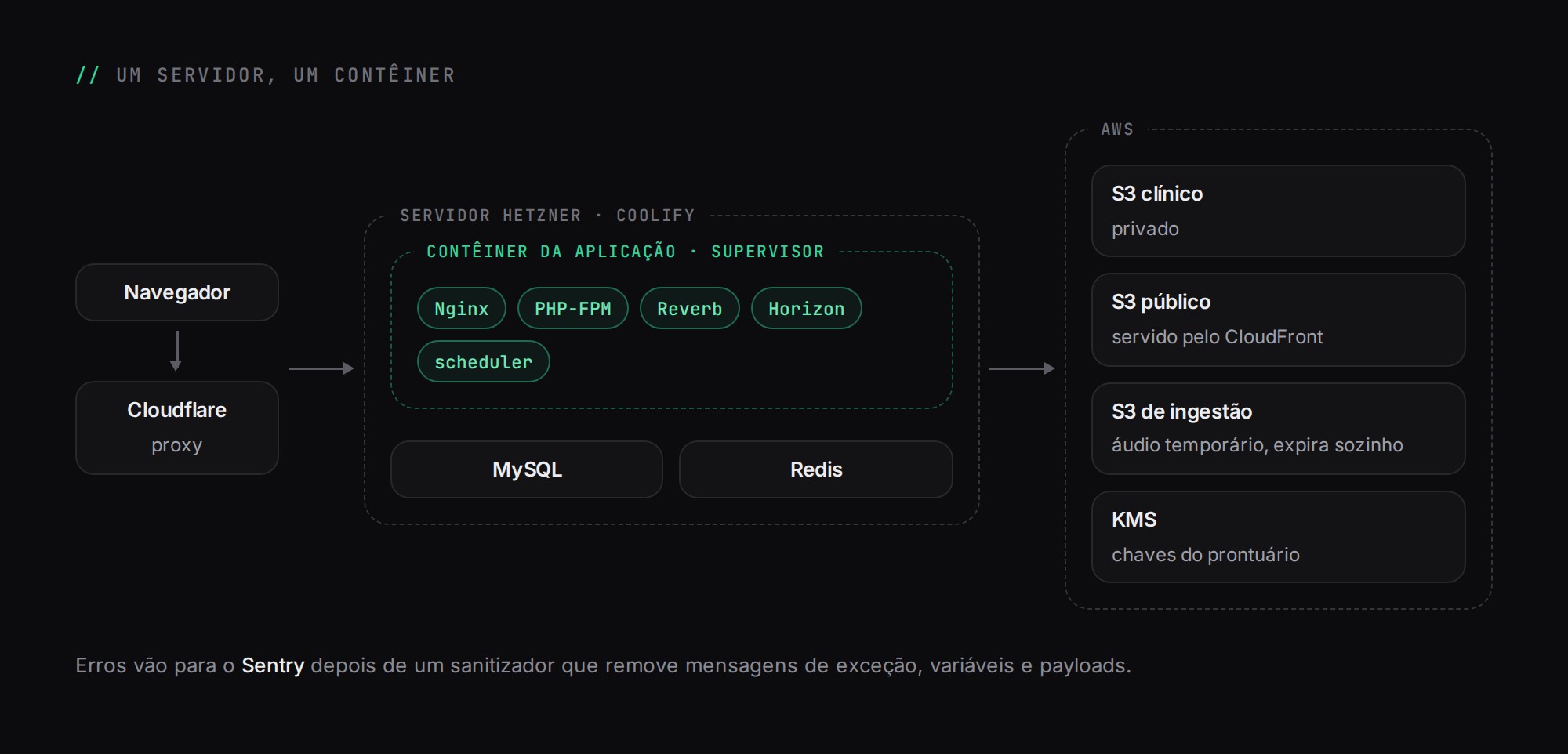
MySQL and Redis run as Coolify resources, outside the image. Files live on AWS, in three S3 buckets with distinct roles: clinical (private), public (served through CloudFront) and a temporary ingestion bucket for telehealth audio, which expires on its own. Errors go to Sentry, with a sanitizer that rebuilds each event and strips exception messages, stack variables and payloads before sending, because exception messages are a classic place for patient data to leak.
I chose one container with several processes instead of one container per process because, with a single replica, the separation doesn't buy real isolation and multiplies the deployment work. The downside is well known: if Horizon goes down, the site stays up and nobody notices. That is handled by monitoring, further below.
From pull request to production
The main branch is protected and only accepts merges with a green CI. CI on GitHub Actions has several independent jobs, each answering a different question:
Job | What it guarantees |
|---|---|
lint | Pint, Prettier and ESLint |
ci | Unit and feature tests on PHP 8.4 and 8.5, in parallel, plus front-end tests |
browser | Browser tests with Pest and Playwright, split into four shards |
schema | Every migration on a real MySQL 8, plus checks SQLite doesn't do |
queue-state and cache-state | Queue behavior with real Redis and Supervisor: crashes, redelivery and graceful shutdown |
The details of the suite are in TDD and CI. After the merge, Coolify receives the webhook, builds the image and only switches traffic over once the new container's healthcheck responds. If it doesn't, the previous version stays live.
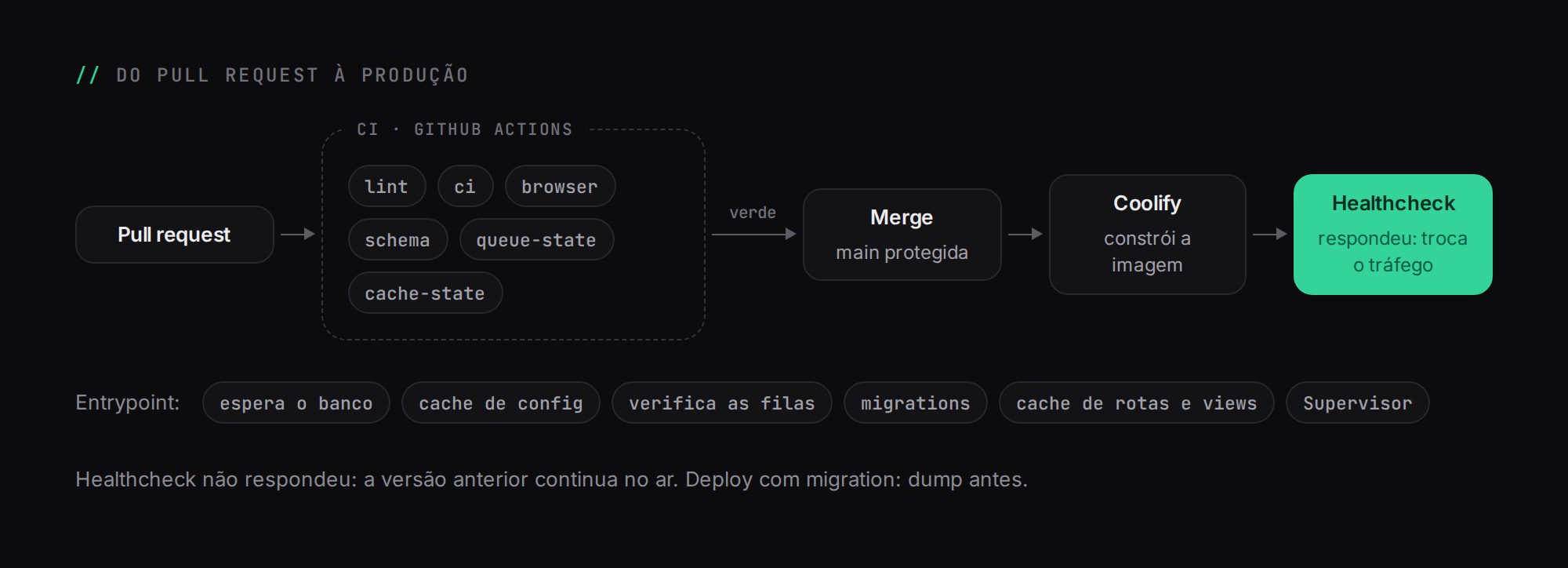
The container entrypoint is short and ordered: it waits for the database, caches the configuration, runs a check of the queue runtime (so it doesn't start with incompatible Horizon and queue configuration), applies migrations and only then caches routes, events and views and hands control over to Supervisor.
The rule for deployments with migrations is to take a dump first. It is the point of return. Rolling back code is one click in Coolify (selecting the previous image); rolling back data requires the point-in-time recovery procedure described below. And every rollback is followed by a revert PR on main, otherwise the next merge brings the bug right back.
The continuity plan
The plan starts from an uncomfortable question: what do I lose if, right now, I lose access to the server provider account? With the provider's daily backup, the answer was "everything", because the backup lived in the same account. The yardstick I used was the 3-2-1-1-0 rule: three copies, on two media, one outside the provider, one immutable and zero errors in the restore test.
Separate accounts
There is an AWS account just for backups, with a different email, a different password and MFA, outside the production organization. The credential the server uses to upload backups can write, but cannot delete protected versions. The premise is that a server compromise exposes everything in its environment, so nothing on the server can be allowed to destroy the backup.
Database: daily dump and binlogs every 5 minutes
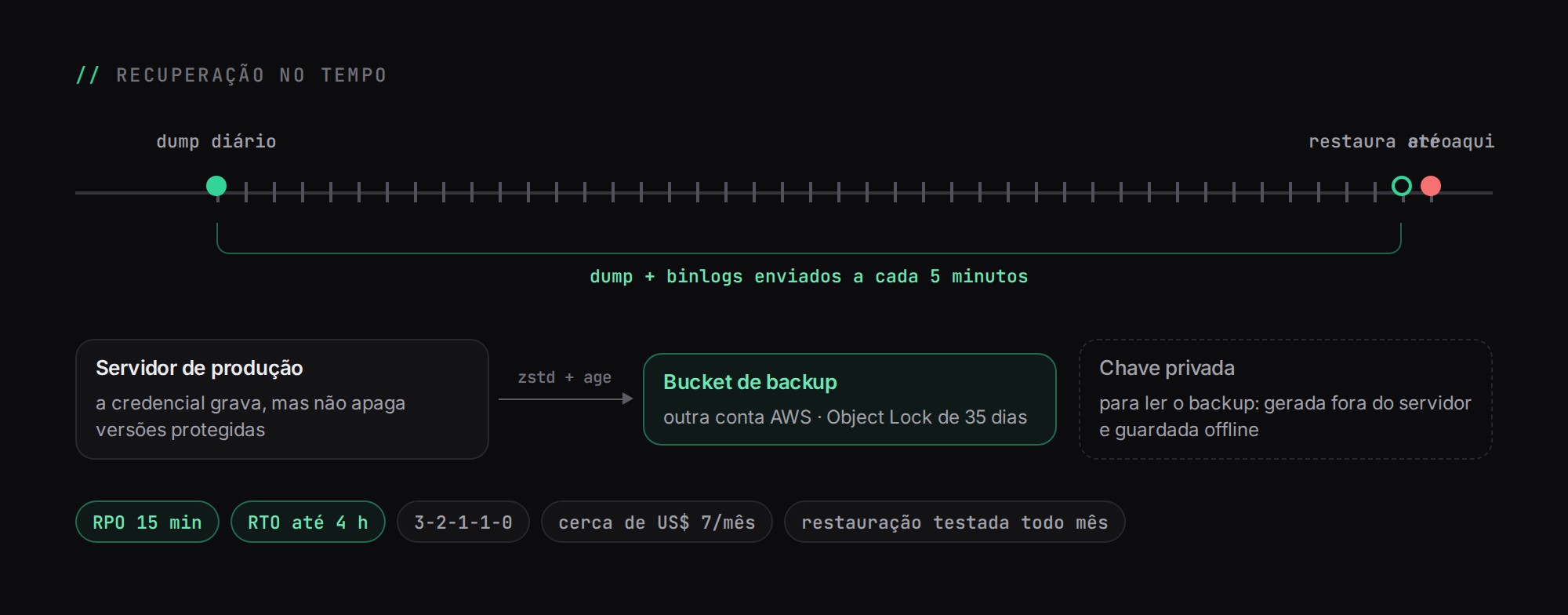
Once a day, a consistent MySQL dump is taken, compressed with zstd and encrypted with age using a public key. The private key has never been on the server: it was generated elsewhere and is kept offline. Every five minutes, closed binlogs are uploaded to the same bucket, which has Object Lock with 35-day retention.
With the dump from the start of the day and the binlogs that follow, I can restore the database to one minute before a mistake, such as a migration that deleted what it shouldn't have. That takes the RPO from "up to 24 hours" to 15 minutes, and the RTO target to up to 4 hours.
# sketch of the dump pipeline (simplified)
mysqldump --single-transaction --source-data=2 ... \
  | zstd -3 \
  | age -r "$PUBLIC_KEY" \
  | aws s3 cp - "s3://$BUCKET_BACKUP/mysql/dump/$STAMP.sql.zst.age"
Files: versioning and cross-account replication
The clinical and public buckets have versioning turned on, with old versions expiring after 90 days. A regular DELETE only creates a delete marker. They also replicate to the backup account, with a setting that matters a lot: delete marker replication is turned off. If something deletes files in production, the replica stays intact.
Keys
Since the medical record encryption work, a database dump on its own can't recover clinical text: each clinic's keys are encrypted by a master key in AWS KMS. If the production account goes away, the master key goes with it. That's why it was created as multi-Region, with deletion protected by policy and alerting, and there is a recovery copy of each clinic's data keys, encrypted with a public key whose private key is also kept offline.
Monitoring that doesn't depend on what failed
Sentry sees the exceptions the application manages to send. A server that is down sends nothing, so monitoring has layers:
- A health route that checks the database, Redis, Horizon and the scheduler heartbeat, monitored from outside. It is separate from the route Docker uses as a healthcheck, so that a database outage doesn't make Docker restart the application for no reason.
- Heartbeats on critical scheduled tasks (billing, payments, recurring financial entries), using the Laravel scheduler's
pingOnSuccessandpingOnFailure, and on the backup scripts. A missing signal triggers an alert. - An external auditor, in a scheduled GitHub Actions workflow, that lists the backup bucket and checks the age and size of the latest dump and the sequence of binlogs. Its credential can only list names, dates and sizes; no patient data goes through GitHub.
A backup only counts once it has been restored
Every month, a temporary server receives the latest dump and the binlogs up to a chosen time, and I check counts of patients, appointments and clinical records and open a sample encrypted record. Every quarter, a full drill rebuilds the entire environment from scratch, and the measured time is the real RTO, not the estimated one.
The recovery procedures are written up as six runbooks, from R1 (rebuild the server) to R6 (recover the master key or the AWS account), covering point-in-time recovery, deployment rollback, file restore and Redis or disk problems along the way. One detail I learned while writing R1: a restored database turns back the clock on the data. If the application starts normally, the scheduler finds "pending" reminders and "unprocessed" charges and sends everything again to real patients. That's why the runbook brings the application up in maintenance mode, in which the scheduler and Horizon don't run, reviews what must not be repeated, and only then lets it go.
Cost and next steps
All of this added about US$ 7 per month to the bill. There are further steps, and I wrote them down along with the trigger that would justify each one:
- B: a database standby in another region, for an RTO of up to 1 hour;
- C: database and application on separate servers, with a standby, when load and revenue call for it;
- D: a managed Multi-AZ database, if running MySQL myself stops making sense.
None of them replaces the backup: a replica copies a DROP TABLE in seconds.
Infrastructure is the least visible part of Markmedi. The other parts of the series cover queues, medical record encryption and the PWA.