A PWA for a clinical system: installable, with its own push and no patient data in the cache
How Markmedi became an installable app without an app store: a service worker that never stores pages, web push with its own VAPID keys and safeguards for shared front-desk computers.
 Rafael Faria Ferreira
The doctor opens Markmedi on her phone between one patient and the next; the receptionist keeps the schedule open all day on a computer that three people share. Neither of them wants to "go to the website": they want an icon that opens straight into the schedule and a notification when a patient books online. A native app would solve it, at the cost of two app stores, two review cycles and a second codebase. The path I chose was a PWA.
What made this work different from a typical PWA is that the content is medical records. The most important part of Markmedi's service worker is what it refuses to store.
Manifest and installation
The manifest opens in standalone mode, with the dashboard as the start page and a URL parameter so I know the session came from the installed app. It declares two shortcuts, Schedule and Patients, which appear when the user long-presses the icon on Android or right-clicks it on desktop. The icons have a maskable version, so Android can crop them to the system shape without clipping the symbol.
The install prompt respects the user. The app holds on to the beforeinstallprompt event and shows the prompt at the right moment, inside the interface. If the user dismisses it, the prompt goes away for 14 days. On iOS, which has no such event, the prompt turns into "Share → Add to Home Screen" instructions. When the installation happens, I record a pwa_installed event in the first-party tracking (which I describe in first-party tracking in SQL).
iOS still asks for a launch screen per device size. Instead of drawing them by hand, a script generates the images: 15 sizes, in light and dark versions, 30 files in total. Inside the installed app, a lightweight splash appears only in display-mode: standalone.
All of this PWA head markup appears only in the clinic staff's "shell". The patient portal and the public pages (online booking, website) do not offer installation or register a service worker. That makes product sense, because patients use the portal only a few times a year, and it reduces what runs in the browser of anyone who is not staff.
The service worker that does not store pages
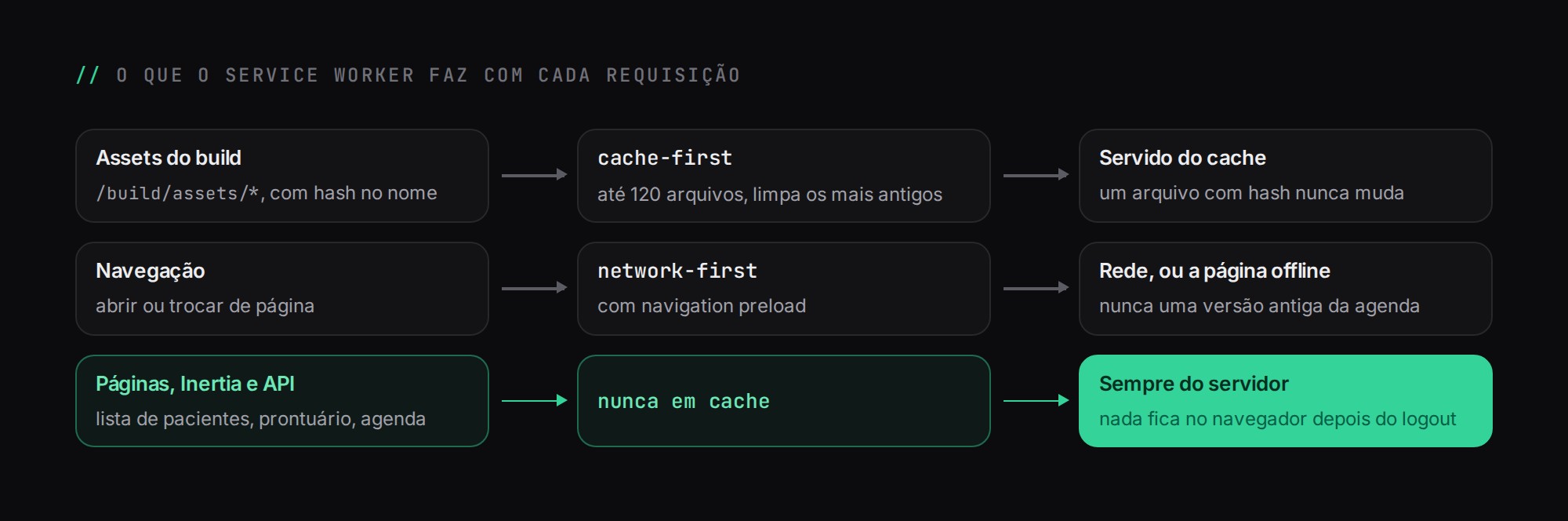
The standard PWA recipe says to cache pages so the app opens offline. In a clinical system, that means leaving the day's patient list, names, phone numbers and excerpts of medical records written to the browser storage of a shared computer, with no expiration and outside the server's control. Logging out does not clear that cache. That is why the service worker's rule is explicit: no page, Inertia response or API response is ever stored.
What it does, in the current version:
- On install, it precaches only the offline page, the notification icon and badge, the favicon and the splash logos.
- Build assets (
/build/assets/*, which have a hash in their names) use cache-first, with a limit of 120 files and eviction of the oldest ones. A hashed file never changes, so serving it from the cache is always correct. - Navigations use network-first with navigation preload, which fires the request in parallel with the service worker's boot. Without a network, the user sees the offline page, which explains what happened. They never see a stale version of the schedule.
- On activate, old versions of the application cache are deleted.
self.addEventListener('fetch', (event) => {
  const url = new URL(event.request.url);

  if (url.pathname.startsWith('/build/assets/')) {
    event.respondWith(cacheFirst(event.request));   // immutable thanks to the hash
    return;
  }

  if (event.request.mode === 'navigate') {
    event.respondWith(networkFirstWithOfflinePage(event)); // never stores the page
  }
  // anything else: the browser handles it, no SW cache
});
The cost is clear: Markmedi does not work offline. I considered an offline mode for the schedule and gave up on it. Syncing changes made offline with a schedule that has concurrency rules on the server (described in scheduling concurrency) would mean rewriting those rules on the client, and the gain for a clinic with bad internet for a few minutes does not pay for the risk.
The sw.js itself and the manifest are served by Nginx with Cache-Control: no-cache, so that a new version of the service worker arrives on the next load and does not get stuck in an intermediate cache.
Web push with no middleman
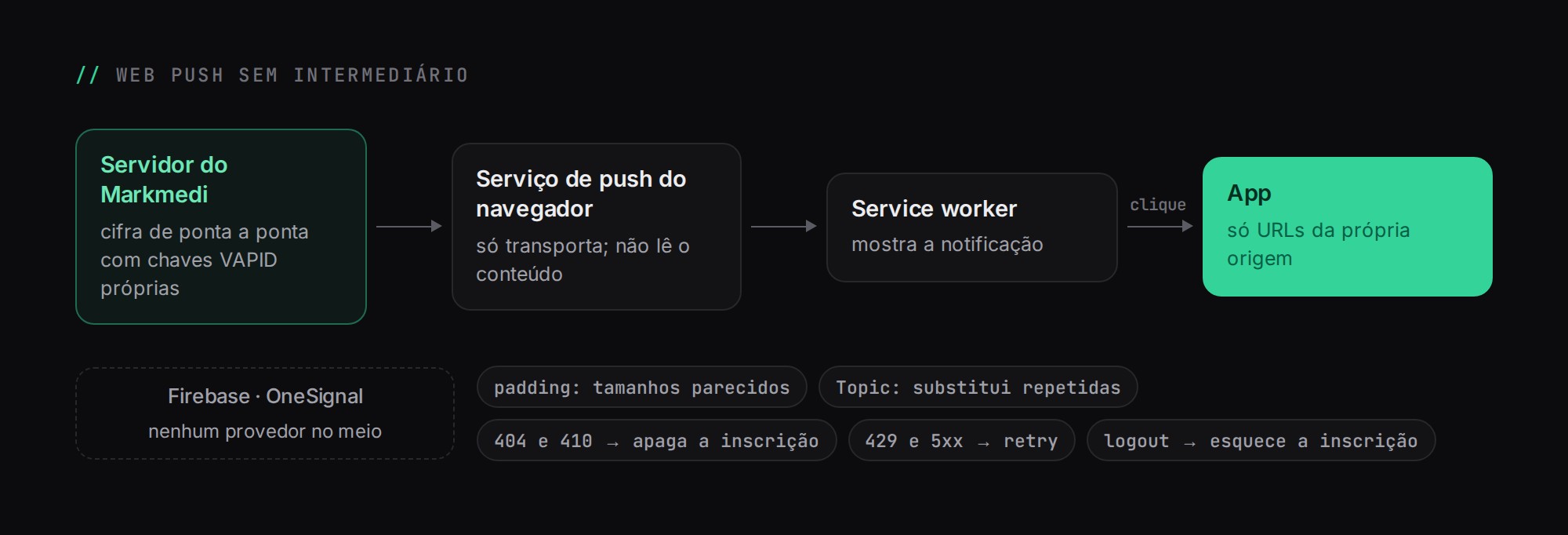
Push notifications use the standard Web Push protocol with our own VAPID keys, through the minishlink/web-push library. There is no Firebase, OneSignal or other provider in between: Markmedi's server encrypts the message and delivers it straight to the browser's push service. One less vendor receiving data about patient appointments.
A few details make a difference:
- Automatic padding. The content is end-to-end encrypted, but the packet size leaks information: "appointment booked" and "appointment cancelled" have different lengths. Automatic padding makes messages similar in size.
Topicheader. Derived from a hash of the notification tag, it makes the push service replace repeated messages while the device is off. Someone who turns their phone on after lunch sees one up-to-date notification, not ten.- Cleanup. 404 and 410 responses from the push service mean a dead subscription, and the row is deleted. 429 and 5xx errors are treated as temporary and retried.
- Safe clicks. On
notificationclick, the service worker only opens URLs from its own origin and, if the app is already open, focuses the existing window instead of opening another one. A notification never turns into a redirect to somewhere else.
Subscriptions live in a table with the endpoint hash as a unique key, the device label and the last-used date. On the preferences screen, each practitioner sees their subscribed devices and can remove any of them.
The front-desk computer
A case that only showed up in real use: the front-desk computer is shared. If Dr. A enabled notifications on it and then the receptionist logs in with her own account, the doctor's notifications cannot keep showing up on that screen. That is why, on logout, that browser's push subscription is forgotten on the server. It is one line of code that prevents a very concrete leak.
What was left out
I did not use Background Sync or Periodic Sync, for the same reason as offline mode: both assume storing something on the device to send later. I also did not build a separate app for patients. The portal works well as a website, and every feature I put in a patient's browser is one more surface to maintain.
The result is an app the clinic installs in seconds, that receives real-time notifications and that, if the device is lost, does not take the medical records with it. The PWA is the layer closest to the user in Markmedi. Real-time updates inside the schedule come from Reverb, the subject of real time with Laravel Reverb.