RAG in practice: from lecture PDF to a sourced answer, with on-device BM25 and Claude
How I built MedRAG, an end-to-end RAG study copilot: ingestion with markitdown and OCR, chunking along the structure of the text, offline BM25 in Flutter and Claude answers that cite their source.
 Rafael Faria Ferreira
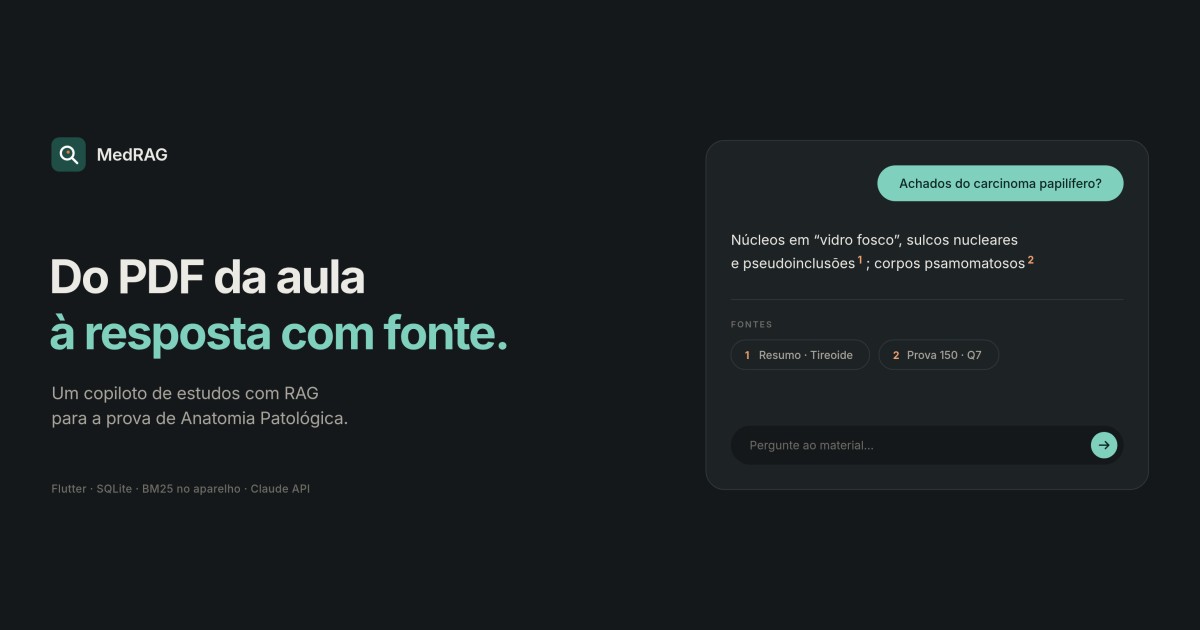
My girlfriend had a few hours left before her Pathology II exam. She had already studied, but the material was scattered across two PDFs: a 40-page summary of the lectures and a 119-page compilation of past exams that mixes typed text, photos of exams, screenshots of forms, answer keys from different sources and handwritten notes. She didn't need to read anything else. She needed to ask "what's the difference between follicular hyperplasia and follicular lymphoma?" and get a short answer, based on the professor's material, saying where it came from.
That is the problem RAG (Retrieval-Augmented Generation) solves, and I wanted to build one end to end, with no framework hiding the decisions. The result is MedRAG, a Flutter app with a copilot that searches for the right passages on the phone itself and sends Claude only what matters. The code is open on GitHub. In this article I walk through the four stages and what I learned in each.
What RAG is, plainly
A language model answers with what it learned in training. It doesn't know the professor's summary, nor that in that course "reactive lymph nodes" in a question means free of neoplasia. The idea behind RAG is simple: before asking the model, you search your material for the passages that cover the topic and put those passages in the prompt. The model then answers based on the text you handed it, and can cite where it got each thing.
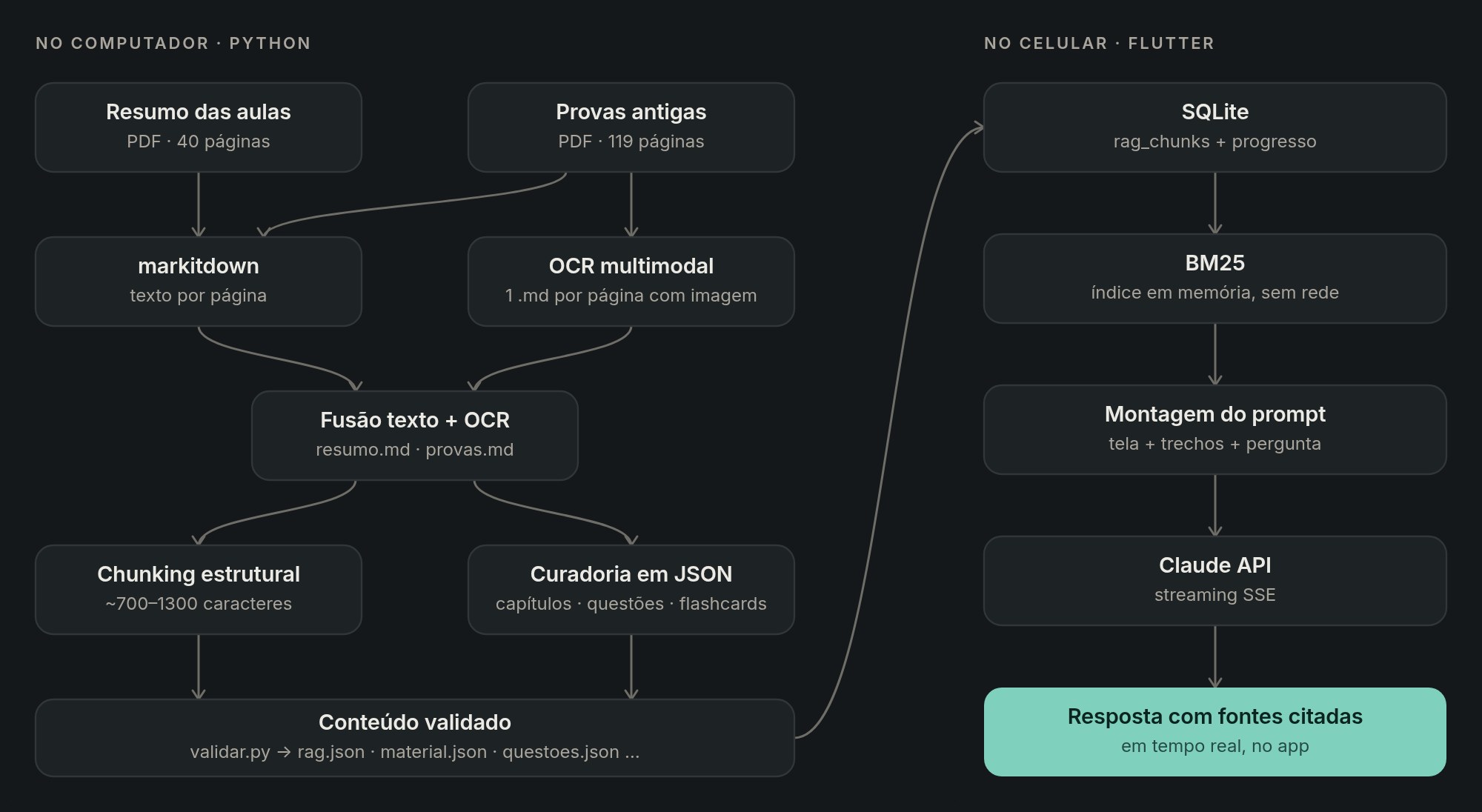
In practice, the system has four parts. Ingestion turns the documents into clean text. Indexing cuts that text into pieces (the chunks). Retrieval picks the right pieces for each question. Generation assembles the prompt and shows the answer. The part that takes the most work is usually the first, and this was no exception.
1. Ingestion: the model is only as good as the text that reaches it
The two PDFs called for different treatment. The lecture summary is typed text, and the challenge is knowing which page each passage is on, so the reading of that page's images can be attached to it. The exam compilation is the opposite: a lot of the information exists only in the photo. The circled option, the handwritten "V" (for true), the professor's correction in the margin: none of that comes out of a text extraction.
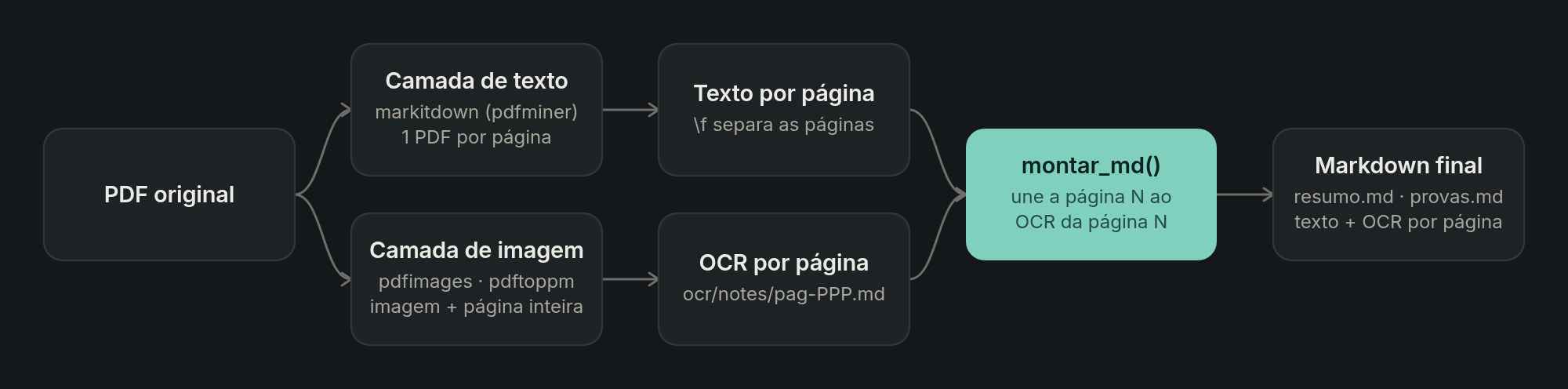
For the text I used Microsoft's markitdown, which converts PDFs and other formats into Markdown designed for LLMs. I ran two passes over the summary. The first converts the whole document and produces the cleanest text, with intact paragraphs and lists. The second converts page by page, which sometimes breaks a paragraph in half, but is the only way to know where each page starts. Then I align the two: I normalize the texts (NFKC, lowercase, letters and digits only), look for the first 30 letters of each page inside the continuous text and mark the page number there. I keep the best of both versions.
For the images I used OCR with a multimodal model, which reads handwriting and skewed photos with glare far better than classic OCR. I extracted the embedded images and also rendered the full pages, because handwritten notes sometimes fall outside the image. What made the difference was enforcing a fixed output format that separates what is printed from what was handwritten:
## Página 37 — foto de prova
**Descrição:** prova de 2024.1, folha com reflexo, alternativa C circulada.
**Transcrição (OCR):**
...printed text, with [ilegível] wherever it can't be read...
**Anotações manuscritas:**
...circled options, T/F marks, professor's corrections...
The handwritten note is the best clue to the true answer key, and it became part of a trust order that follows the system all the way into the prompt: official answer key, then the visible marking on the photo, then a student's answer key, and last the AI-generated answer key, which is the least reliable. When a passage was illegible, the rule was to crop and enlarge the image before giving up.
Finally, a script interleaves, page by page, the markitdown text and the OCR block, and generates two Markdown files. They are the single source for everything that follows: the RAG chunks and also the curation of the rest of the app (chapters, 141 questions with answer keys and 259 flashcards). The build is idempotent, so running it again without changing the source produces exactly the same files.
2. Chunking: the structure of the text matters more than the search algorithm
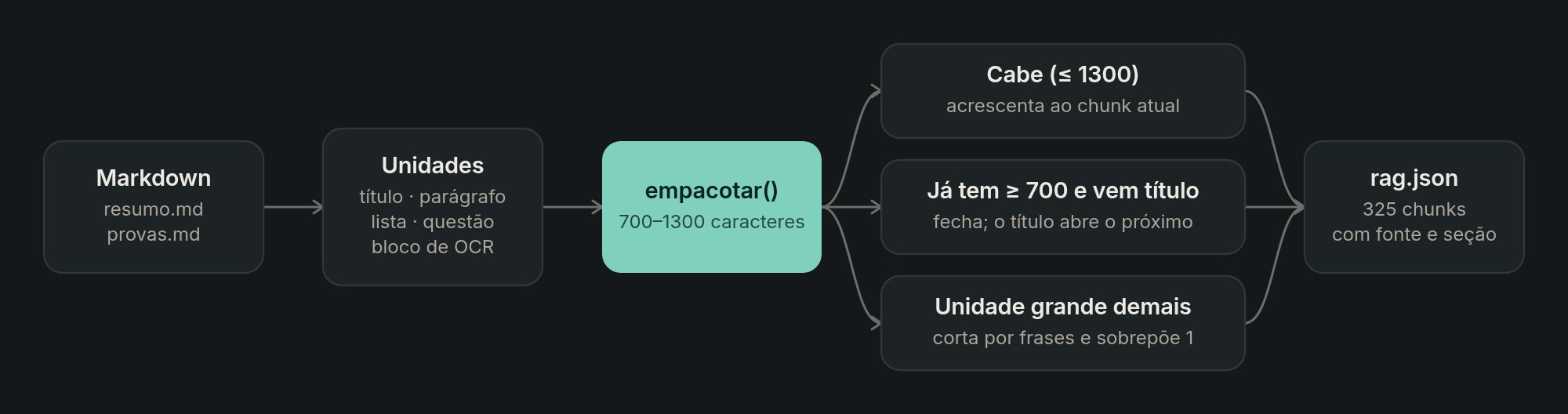
If I had to pick one lesson from this project, it would be this one. A chunk has to fit in the prompt and make sense on its own, because that is how it will reach the model: out of context. Cutting every N characters produces pieces that start in the middle of a sentence and end in the middle of a question. That's why the cuts follow the structure of the document.
Rule | Why |
|---|---|
Target of 700 to 1,300 characters | Big enough to carry a whole line of reasoning, small enough to send 7 passages per question |
Cut before a heading and never leave a heading at the end | The chunk starts with the topic, and the heading helps the search |
One sentence of overlap when prose is cut | An idea that spans the cut isn't lost |
A | A piece retrieved on its own still says where it came from |
Merge very short passages and discard leftovers with no content | Avoids useless chunks like "no photo of the exam" |
Human-readable source and section, such as | They become the citation shown in the answer |
The result was 325 chunks: 77 from the summary and 248 from the past exams, with a median of 1,137 characters. No amount of tuning the search parameters improved answer quality as much as these cutting rules.
3. Retrieval: why BM25 and not embeddings
The standard RAG path today is to generate embeddings and store them in a vector database. Here I chose BM25, a classic lexical search, running on the phone with no network. There were three reasons. The vocabulary is technical and exact: CD20, bcl-2, Reed-Sternberg, psamoma (psammoma). In this domain, hitting the exact term matters more than semantic similarity, and generic embeddings get confused by acronyms. The corpus is small, 325 chunks, and the index is built in memory in milliseconds. And the solution depends on nothing: no embedding model, no extra API call, no vector database. The app's only network call is the one to Claude.
The hardest part was tokenization for medical Portuguese. Everything is lowercased and stripped of accents, acronyms are normalized (bcl-2 becomes bcl2, CD20+ becomes cd20), stopwords are removed and a very light stemmer merges "folículos", "folicular" and "foliculares" (follicles, follicular). The section heading goes into the indexed text twice, so it weighs more.
"Os folículos têm CD20+ e BCL-2?"
  → no accents, lowercase    → "os foliculos tem cd20+ e bcl-2?"
  → acronyms normalized      → cd20, bcl2
  → no stopwords             → foliculos, cd20, bcl2
  → light stemming           → [folicul, cd20, bcl2]
The scoring is textbook BM25, with k1 = 1.4 and b = 0.72. The idf rewards rare terms, so "psamoma" (psammoma) is worth more than "tireoide" (thyroid), and b keeps a chunk from winning just because it is long. The top 7 are kept, as long as they have at least 28% of the first one's score. That relative cutoff avoids sending noise when only two passages are truly relevant.
The on-screen context trick
Students don't ask questions the way people write search queries. She opens the lymphadenopathy chapter, reads it, and asks "explain this another way". That question alone retrieves nothing. The fix was to add what is open on screen to the query, with a lower weight: the question's terms weigh 1.0 and the terms from the chapter title and the first 400 characters on screen weigh 0.35. The vague question now pulls in the right topic, and a specific question about something else still wins, because its terms weigh almost three times as much.
final q = <String, double>{};
for (final t in tokens(pergunta)) {
  q[t] = (q[t] ?? 0) + 1.0;
}
for (final t in tokens(contextoDaTela)) {
  q[t] = (q[t] ?? 0) + 0.35; // a boost, not a replacement
}
Each screen in the app registers its context on a stack when it opens. The copilot is a floating button present on every screen, and it always knows what she is looking at.
4. Generation: the prompt is an interface
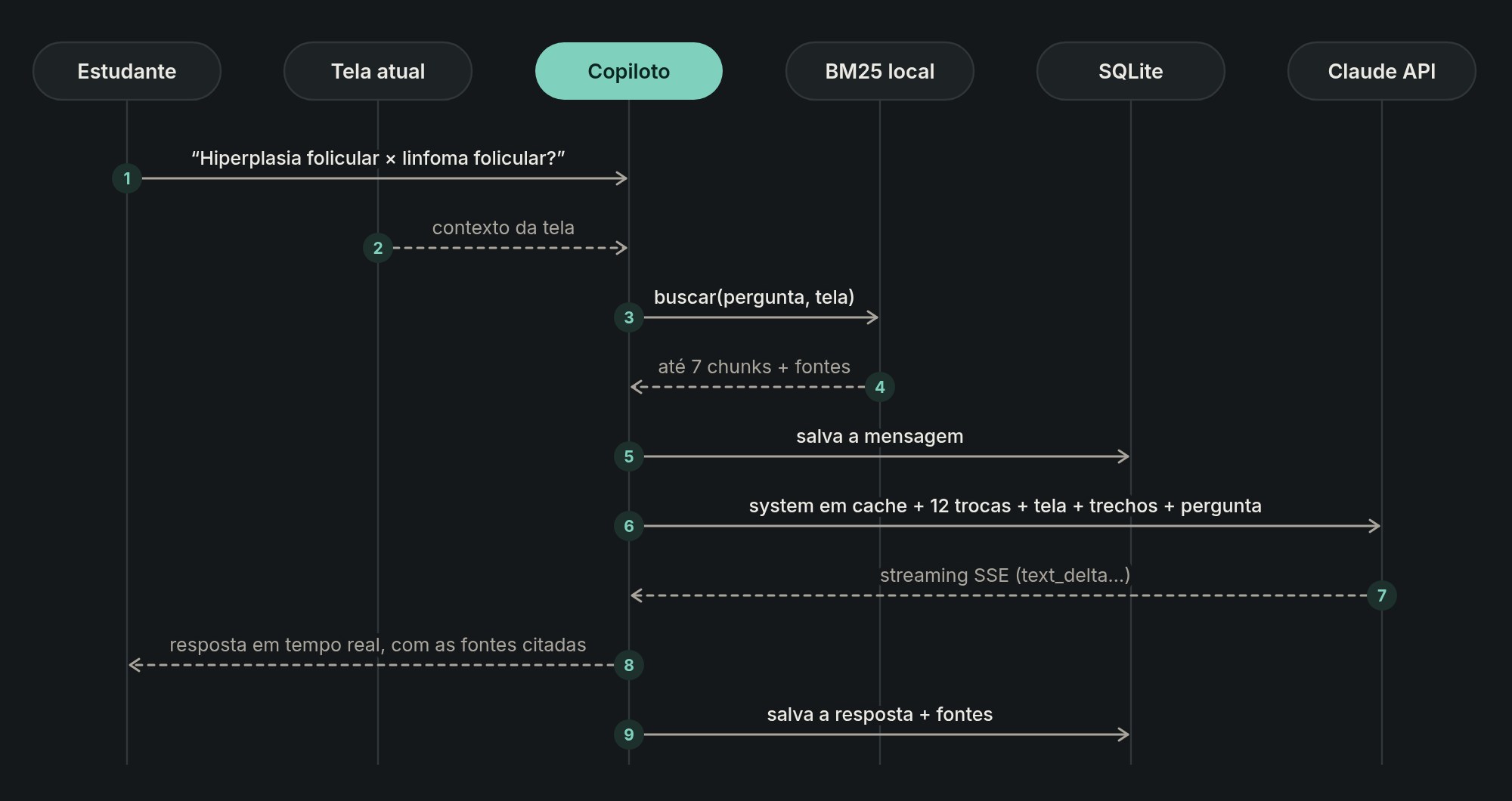
Each turn sends Claude three blocks separated by XML tags, which makes it clear to the model what is context, what is reference material and what is the question:
<contexto_da_tela onde="Linfadenopatias › Padrão folicular">
  ...what she is looking at, up to 7,000 characters...
</contexto_da_tela>

<trechos_recuperados>
[Resumo · Linfadenopatias — HIPERPLASIA FOLICULAR]
...chunk...
---
[Prova 148 · questões 3–5]
...chunk...
</trechos_recuperados>

<pergunta>
Qual a diferença entre hiperplasia folicular e linfoma folicular?
</pergunta>
A few decisions here made a real difference.
- Passages go only in the current turn. The history carries only the text of the last 12 messages, without the old passages. The prompt doesn't grow without bound, and the search is redone for every question, so a conversation that changes topic retrieves the new material.
- The system prompt is cached. It is long and identical on every call, so marking it with
cache_controlcuts cost and latency from the second question on. - The source hierarchy lives in the prompt itself. The official answer key and the summary outweigh an AI-generated answer key. When the answer isn't in the passages, the model says so in one sentence and labels the rest as "Complemento" (supplement). That is what keeps the RAG from turning into a generic chat dressed up as official material.
- The course's rules become instructions. A complete diagnosis, no lymphoma diagnosis without immunohistochemistry, markers cited with + and −. What the professor looks for when grading becomes the copilot's behavior.
- Study modes. She can ask to be quizzed, one question at a time with feedback, or paste an essay answer to have it graded against the model answer and the question's checklist.
The sources of the retrieved passages are stored with the answer and show up as chips below it. In material whose answer keys contradict each other, seeing "Resumo · Tireoide" (Summary · Thyroid) or "Prova 150 · Q7" (Exam 150 · Q7) next to the answer is what makes it trustworthy enough to use.
The HTTP client is written in Dart, with no SDK, with SSE streaming and Portuguese error messages for the common cases: key rejected, rate limit hit, service overloaded, no internet. Biomedical content sometimes trips a safety classifier by mistake, so the request uses the API's server-side fallback: if the main model refuses, the API itself retries the request on another model. No key ships inside the app. Each person pastes their own key, which stays only in the device's SQLite and goes only to the Anthropic API. For personal use that is enough; to publish the app for other people, the right approach would be an intermediate backend.
What I would do differently
BM25 was the right choice for this corpus, but it has a clear limit: if the question uses a synonym that doesn't appear in the text, the search won't find it. The natural next step is hybrid search, BM25 plus embeddings, with re-ranking of the candidates before assembling the prompt. Another step worth taking is an evaluation set: around 30 questions with the passages that should come back, to measure recall on every change to the chunking or tokenization, instead of testing by hand. In RAG, changing the cutting rule changes everything, and without measuring it is easy to improve one case and make ten worse.
Takeaways
- Ingestion is most of the work. markitdown handles the text, but photos of exams call for vision OCR and a strict output format.
- Structure-aware chunking beats a sophisticated algorithm. Respecting headings, questions and sentences, and giving each chunk a readable source, was the biggest quality lever.
- BM25 is a great start in a technical domain with a small corpus: simple, explainable, offline and good with acronyms.
- What is on screen is a cheap, strong signal. Adding that context to the query, with a lower weight, fixes vague questions without asking the person to rephrase.
- Citing the source is what turns a plausible answer into one you can trust.
The code, the diagrams and the instructions to run it are on the MedRAG project page and in the GitHub repository.