Shareable certificates as a growth channel: the page LinkedIn sees
How I designed the certificate of a corporate learning platform to travel on LinkedIn: two public pages, Open Graph in the server-rendered HTML and privacy by default.
 Rafael Faria Ferreira
There is one moment when a learner wants to talk about the product of their own accord: when they finish the course and receive the certificate. They will not post about lesson three or the video player. They will post about finishing, because that says something about them. On the B2B ticketing and courses platform I designed and built, I treated that moment as an acquisition channel. The product's job is to make sharing frictionless and to make the page the post opens work for the platform.
Below is how it works today and what is still missing to close the loop.
The loop
The sequence is short: the learner completes the course, the certificate is issued, they post it on LinkedIn or add it to their profile, people in their network see a credential with a link, click it, land on a page that proves the certificate is real and shows what the course is, and some of them go on to the catalog.
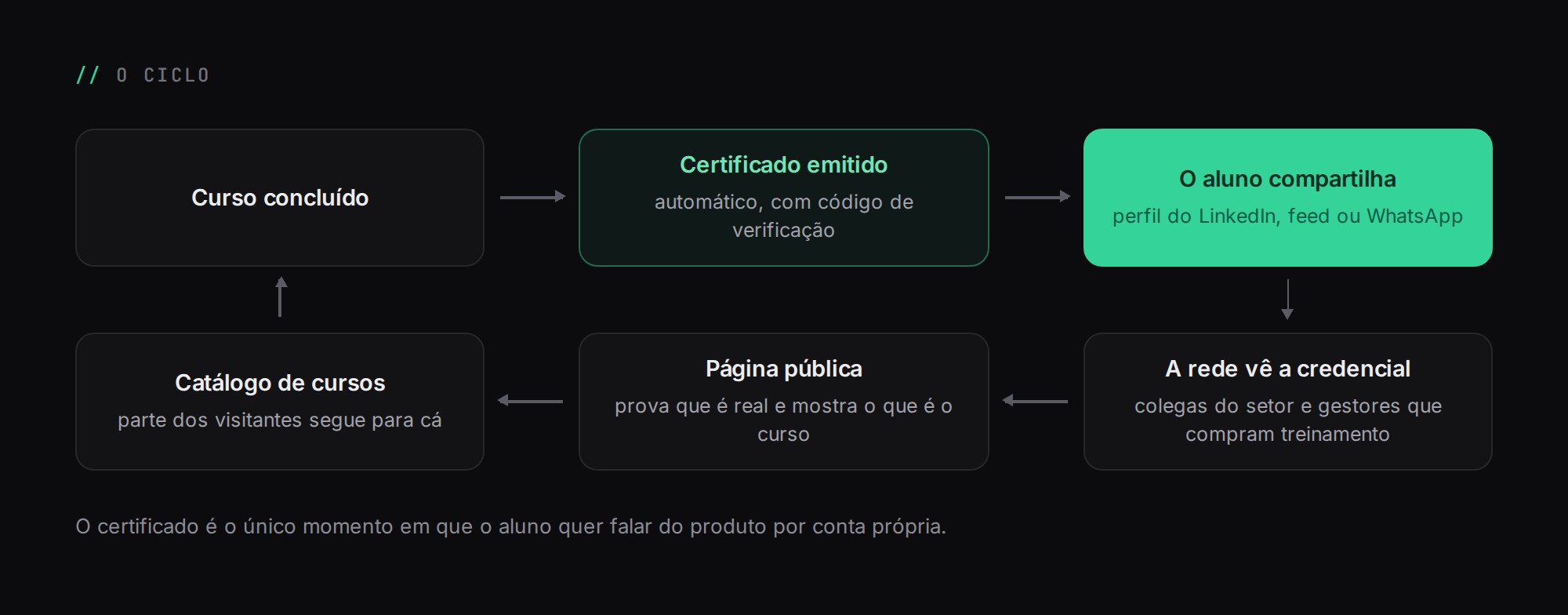
In B2B, this loop has an advantage. Many learners are employees of a company that bought seats, and their network is full of colleagues in the same industry and of managers who buy training. That is exactly the audience the platform wants, arriving through a recommendation from someone they trust.
Issuance has to be reliable before it can be shareable
Nobody shares a document that might disappear or change. The certificate is issued automatically by a listener on the course-completed event, one per enrollment. Idempotency comes from a unique index in the database, not from an if: if the event fires twice, the second insert fails and issuance returns the certificate that already exists.
The certificate row stores a copy of the learner's name, the course title, the course hours and the dates. If someone renames the course later, the certificate still says what it said on the day it was issued. The PDF is generated with dompdf outside the transaction and stored in private storage. If the PDF fails, the certificate still exists and can still be validated.
The verification code follows the XXXX-XXXX-XXXX format, with an alphabet that leaves out the characters most often confused when transcribing: 0 and O, 1, I and L, and U. It is random, so nobody can guess the neighboring code, and typeable, because someone is going to check it by reading it off a piece of paper.
Two pages, two readers
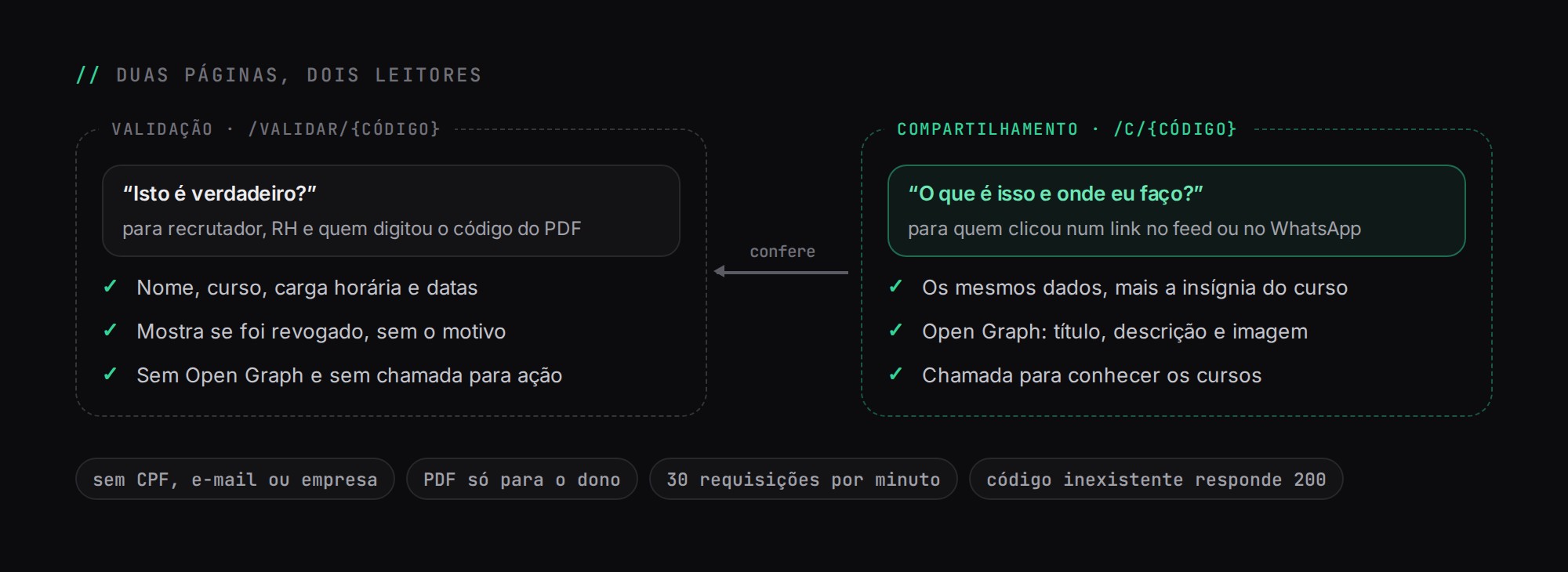
The most important product decision was not to have a single page. Someone verifying a certificate and someone clicking on a post are asking different questions.
Validation: /validar/{código} | Sharing: /c/{código} | |
|---|---|---|
| Who arrives | Recruiters, HR, someone who typed in the code from the PDF | Someone who clicked a link in their feed or on WhatsApp |
| Question it answers | "Is this real?" | "What is this and where can I take it?" |
| Content | Name, course, course hours, dates, whether it was revoked | The same, plus the badge tied to the certificate and a link to the validation page |
| Open Graph | No | Yes: title, description, article type and image |
| Call to action | None | Browse the courses (for visitors); download the PDF (owner only) |
Merging the two would cost one of them. Either the verification page would pick up marketing and lose credibility, or the shared link would open a dry record that invites nobody to do anything. Kept apart, each one does a single job.
The sharing page has no share button. Sharing belongs to the owner, and it lives in their progress area. Whoever opens the page got the link from someone else.
Adding to the profile versus posting to the feed
In the progress area, each certificate offers two outlets. The main one is "add to LinkedIn profile", which uses LinkedIn's own add-certification URL and opens the form already filled in:
https://www.linkedin.com/profile/add?startTask=CERTIFICATION_NAME&name={course}&organizationName={organization}&issueYear={year}&issueMonth={month}&certUrl={validation URL}&certId={code}name: the course title stored on the certificate.organizationName: the platform's name as the issuer.issueYearandissueMonth: the issue date.certUrl: the validation page, not the sharing page. Someone clicking a certification on a profile is checking it.certId: the verification code.
The other outlet is WhatsApp, with https://wa.me/?text=… carrying the link to the sharing page. Badges have their own public page, /i/{código}, and use the feed share URL: https://www.linkedin.com/sharing/share-offsite/?url={badge page}.
The difference between the two matters for growth. A feed post produces a spike that lasts a few days and fades. A certification on a profile is permanent: it sits under licenses and certifications, with the platform as the issuer and a link back, seen by every recruiter or manager who opens that profile for years to come. That is why it is the primary action.
What makes a shared link look good
When someone pastes a link into LinkedIn or WhatsApp, the network's crawler downloads the page's HTML and reads the Open Graph tags to build the card. That crawler does not run JavaScript. In an Inertia app with Vue, the initial HTML is a skeleton; if the tags are injected by JavaScript, the card comes out with no title and no image.
On the platform, the tags come from the server through two paths. The normal path is Inertia SSR: the controller passes a meta object along with the page props, a single Vue component places the title, description, Open Graph and Twitter Card tags inside <Head>, and the SSR server renders that head into the HTML of the first response. The second path is a safety net: if the SSR service is down, the root Blade view reads the same meta from the props and writes the same tags. In neither case does the crawler depend on JavaScript.
For the sharing page, the title is {Name} · {Course}, the description says it is a certificate of completion for that course along with its hours, and the type is article. The image is the share artwork for the course's badge, uploaded in the admin at 1200×630, when there is one. Every URL in the tags is absolute, because the crawler does not resolve relative paths.
I did not generate a per-certificate image in this version: the person's name appears in the card title, not in the artwork. A correct generic image in the feed beats a personalized one with a mistake in it.
Privacy by default
A public page with someone's name on it has to decide what it does not show. Both pages show name, course, course hours and dates. They do not show the CPF (Brazil's individual taxpayer ID), email or company. The PDF, which includes the CPF, is only offered to the logged-in owner, and the download link goes through a route that checks ownership.
Certificates can be revoked. The page shows that a certificate was revoked, but the reason is never public.
There is also protection against enumeration. The three public routes, for validation, sharing and badges, are limited to 30 requests per minute and return a 200 with the same shape for a code that does not exist. If any of them returned a 404, a script could count the responses and work out which codes are valid.
Why the validation link is what makes learners share
This is the argument that ties trust to growth. A certificate without verification is an image anyone can make in an editor. A certificate with a code and a public page confirming that it exists, for whom, for which course and whether it is still valid, is worth something to whoever receives it. The learner shares it because the credential is worth something, and it is worth something because anyone can check it. The validation page is not a compliance cost; it is what gives the post a reason to exist.
What is still missing to close the loop
The loop works, but today it is blind. The code does not record clicks on the share buttons, does not count visits to the public pages and does not tag the source of people who reach the catalog through them. That is why I have no numbers to show. The next steps I would take:
- UTM parameters on outgoing links. Every link generated for LinkedIn and WhatsApp would carry
utm_source,utm_mediumandutm_campaign, so the visit arrives already identified. - Count visits and clicks. Record visits to the sharing page (separating the owner from visitors) and clicks on the catalog button.
- A call to action for the specific course. Today the button leads to the general catalog. Someone who saw a colleague finish a course wants to see that course.
- A per-certificate Open Graph image. Artwork generated with the name and the course, cached and refreshed if the certificate is revoked.
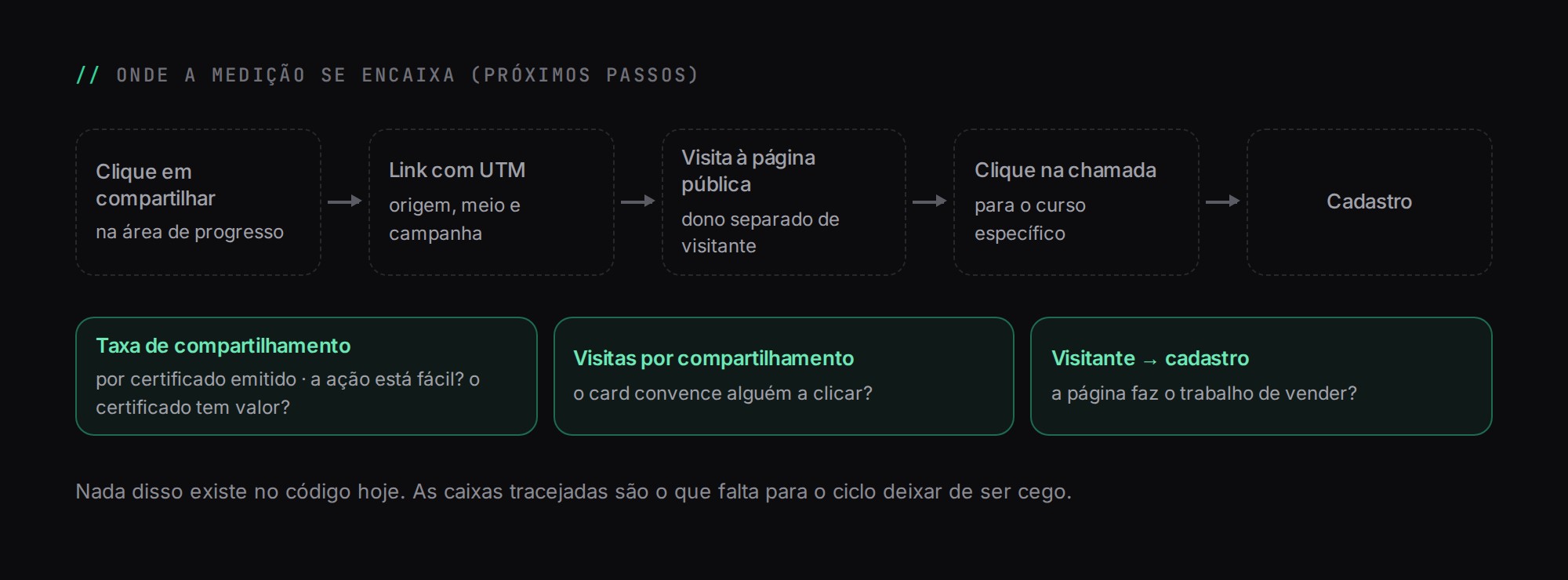
With that measured, there are three metrics I would track: share rate per certificate issued, which tells me whether the action is easy and whether the certificate has value; visits per share, which tells me whether the card convinces anyone to click; and visitor-to-sign-up conversion, which tells me whether the page does the selling. Each one points to a different part of the loop.
Wrapping up
The product does not need to convince anyone to post. It needs to remove friction, make the link look good in the feed and make sure the page on the other end proves it is real and shows where to go next. The rest of the platform's design works to get the learner to that moment: the personalized learning paths and gamification in corporate learning, which is where the badges come from.